



Confidence Scores You Need to Know
- samir@cenango.com
- Read time: 5 Min

Share This Post
Table of Contents
Related Posts
Subscribe for Insights
Stay informed with helpful content on AI document processing, document extraction, and smarter business workflows.

AI document processing is the use of artificial intelligence — including machine learning, OCR, and natural language processing — to automatically read, classify, extract, and validate data from documents, then route that data into business systems without manual entry.
Key highlights:
- A confidence score is a probability, not a guess. It comes from the model’s own output layer. This often runs through a function called Softmax or Sigmoid
- Confidence is not the same as accuracy. A model can be 92% accurate overall. But it can still show low confidence on one tricky field
- A “well-calibrated” system is one where the score matches reality. A 0.8 confidence score should be correct about 80% of the time .
- Printed text typically reaches over 99% recognition accuracy. Handwritten text is far less consistent. Its word error rates can run several times higher
- This isn’t a new idea. Patent filings on OCR systems describe confidence-based flagging of unclear characters. Some go back decades
What Is a Confidence Score?
A confidence score is a number a model attaches to one of its own answers. It is the model’s own estimate of how likely that answer is to be correct.
It is shown as a percentage, or a decimal between 0 and 1. A score of 0.92 means the model is fairly sure. A score of 0.35 means it’s mostly guessing.
This idea isn’t unique to documents. It comes from machine learning in general. A model’s final layer often runs the answer through a math function. Softmax handles multi-choice answers. Sigmoid handles yes/no answers. That output becomes the confidence score
Example: An object-detection model that spots a bicycle in a photo with 92% confidence is saying: based on everything I’ve learned, there’s a 92% chance this really is a bicycle. The same logic applies to a document field. A 92% confidence on an extracted date means the model is fairly sure, not certain.
What Is a Confidence Score in AI Document Processing?
In AI document processing specifically, a confidence score is attached to each individual field pulled from a document — not to the whole document at once.
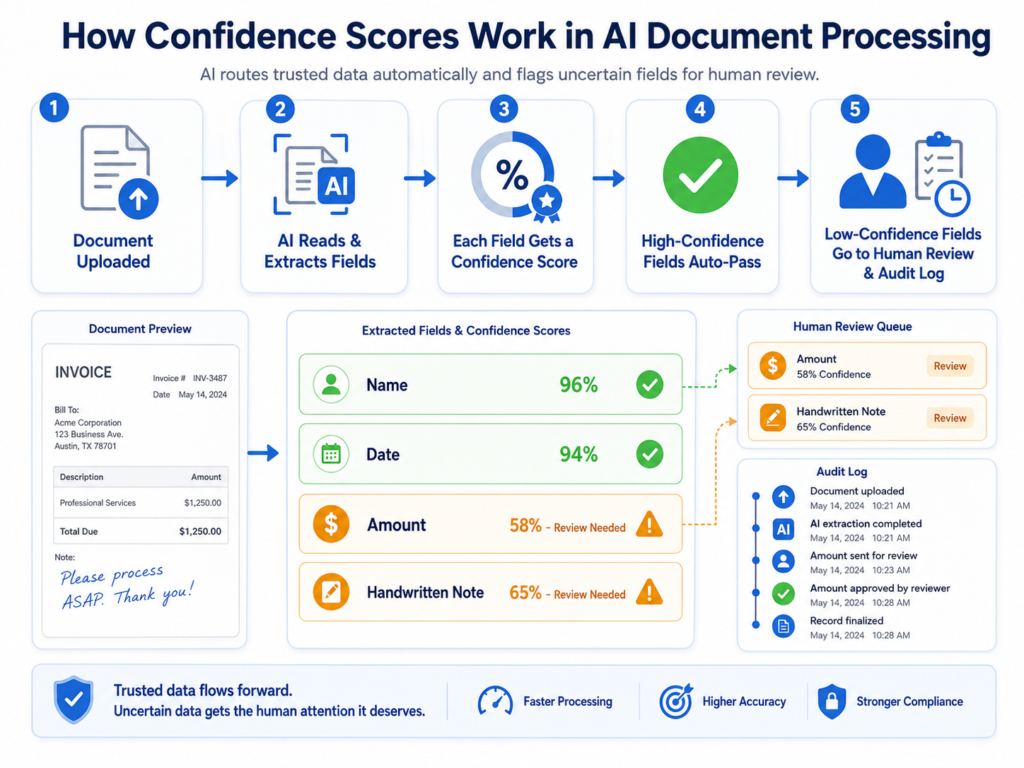
When the system reads a form, it doesn’t just hand back a name, a date, and an amount. It hands back each of those values along with a number that says how sure it is about that one value.
Example: A scanned utility bill gets processed. The billing address comes back with 96% confidence. The amount due comes back with only 58% confidence, because the print is smudged in that one spot. Both fields were extracted. Only one of them earned real trust. |
This field-level detail is what makes the score useful. A single score for the whole page would hide the fact that one field is shaky while the rest are fine.
Is This a Module or a Feature?
It depends on the platform, but functionally, it’s best understood as a feature built into the extraction engine, not a separate add-on module you bolt on later.
Here’s the distinction:
- As a feature, confidence scoring is generated automatically every time a field is extracted. It’s part of how the model works, not something turned on afterward.
- As a module, the rules around that score — thresholds, routing, review queues, dashboards — are often a separate, configurable layer that sits on top of the raw score.
So the score itself is built-in. What you configure is what happens because of the score.
How Does This Work in AI Document Processing?
Most systems follow the same basic steps:
- The model reads the document and identifies each field.
- It scores its own certainty for every field individually, not just the page as a whole.
- The score is compared to a threshold — a cutoff point set in advance.
- High scores pass through automatically. The data moves straight into your system.
- Low scores get flagged. A person checks that specific field before it’s trusted.
This same idea — flag the unclear characters, trust the clear ones — isn’t new. It shows up in OCR error-checking systems from patent filings in the 1990s. That’s long before today’s AI models existed . The mechanism isn’t new. What’s improved is how accurately modern models estimate their own certainty.
How Confidence Scores Are Implemented
A “threshold” is the cutoff point a system uses to decide: pass this through, or send it to a human? Most platforms layer a few different kinds of thresholds together, rather than relying on just one.
Field-Level Threshold
This sets a different bar for each individual field, based on how much that field matters. A high-risk field, like a payment total, can require a stricter cutoff than a low-risk field, like a notes section.
Example: An invoice’s “total amount” field might need 95% confidence to auto-pass. A free-text “notes” field might be fine at 75%, since a wrong note costs far less than a wrong total.
Document-Level Threshold
Instead of judging one field, this rolls every field’s score into a single number for the whole document. If that overall number falls below the bar, the entire document gets routed for review, even if only one field was shaky.
Example: A 5-field form where four fields score 99% and one scores 60% might still produce a document-level score low enough to flag the whole form for a quick check.
Document-Type Threshold
This sets the bar based on the kind of document, not just what’s inside it. Riskier document types get stricter thresholds than routine ones.
Example: A medical report might need a 95%+ bar before it’s trusted automatically, while a general cover letter might be fine at 80%, since the cost of a mistake is much lower.
Dynamic Threshold
Instead of a fixed number set once and forgotten, this threshold adjusts itself over time as the system learns from corrections.
Example: A new document type might start with an 85% threshold. After a few hundred reviewed and corrected documents, the system can responsibly tighten or loosen that bar based on real outcomes, not a guess.
With vs. Without Confidence Scores
| With Confidence Scores | Without Confidence Scores | |
|---|---|---|
| How extractions are treated | Each field gets its own certainty rating | Every field looks the same — no way to tell solid from shaky |
| Review workload | Only the uncertain fields go to a person | Either everything gets reviewed (slow), or nothing does (risky) |
| Error visibility | Low-confidence fields are flagged before they cause problems | Wrong values can pass through with zero warning |
| Scaling automation | Easy to trust more over time as accuracy proves out | Hard to ever fully trust the system, since nothing distinguishes good output from bad |
| Audit trail | Each decision (auto-pass or flagged) is logged with a reason | No record of which fields were uncertain or why |
The core trade-off without this feature: you’re stuck choosing between trusting everything (fast, but risky) or reviewing everything (safe, but slow) — which defeats the point of automating in the first place.
How Confidence Scores Work Across Different Document Types

Not every document is created equal. Confidence shifts a lot, based on what kind of text the system is reading.
Document type — how confidence scores shift
| Document Type | What's Happening | Why Confidence Shifts |
|---|---|---|
| Clean digital/typed text | Computer-generated font, no scanning involved | Easiest case. Printed text recognition regularly exceeds 99% accuracy |
| Scanned paper document | Typed text, but now an image | Scan quality, lighting, and skew can lower confidence slightly, even on originally clean text |
| Typo or spelling errors in source | A typo exists in the original document itself | The model reads exactly what's there. A typo in the source isn't an extraction error — the field can score high confidence while still containing the source's mistake. |
| Grammar errors in source | Awkward or incorrect grammar in the original text | Same logic — grammar issues don't usually lower extraction confidence, since the model is reading characters, not judging writing quality. |
| Handwritten text | Cursive or printed handwriting, varies by person | The hardest case for OCR. Handwriting recognition error rates run several times higher than for printed text, since every person's handwriting is different |
| Signatures | A stylized mark, often not legible as text at all | Signatures are usually treated as a separate detection task — "is a signature present?" — rather than a text-extraction task, since most signatures can't be read as words. |
Example: A claims form might have a typed policy number, a typed date, and a handwritten note describing the accident. The typed fields might score 98% confidence each. The handwritten note might score 70%. That one field gets flagged for review, while the typed fields pass straight through.
This is why per-field scoring matters more than a single score for the whole document. A form showing “90% overall confidence” can still be hiding one handwritten field that’s really just a coin flip.
How LLMs and OCR Work Together on This
Modern document AI usually combines two different technologies. Each one handles a different part of the confidence picture.
- OCR (and handwriting recognition models) handle the visual layer. They turn pixels into characters. This is where a typo, a smudge, or messy handwriting shows up as a lower character-level score.
- LLMs (or similar language models) handle the meaning layer. They figure out which extracted text belongs in which field, even if the layout changes from one document to the next. Their confidence reflects how sure they are about meaning and placement, not just character shapes.
A field’s final confidence score is often a blend of both. One part reflects how clearly the characters were read. The other reflects how confidently the system matched that text to the right field. A handwritten note might score low on the OCR layer, since it’s hard to read. But the LLM layer can still correctly label it as “notes” rather than “policy number.” These are two separate kinds of certainty, working together.
Who Needs to See and Verify Confidence Scores?
Not everyone needs the same view into this. A few roles typically interact with it directly:
- Operations or back-office staff check the review queue — the flagged, low-confidence fields waiting for a human decision.
- Compliance or audit teams review the logged history of scores and corrections, especially for regulated documents.
- IT or platform admins set and adjust the thresholds themselves, deciding what counts as “high enough” to auto-pass.
- Team leads or managers watch aggregate numbers — how many documents needed review, and how that’s trending over time.
Should We Sync With an Existing System, or Check First?
Before connecting confidence scoring to your existing systems, it helps to check a few things first:
- What’s your current error tolerance? A payment system needs a stricter threshold than an internal notes field.
- Does the score appear at the field level, not just the document level? A single document-wide score hides exactly the detail you need.
- Is the score calibrated? Ask whether a 90% confidence field is actually correct about 90% of the time, based on real testing — not just a number the vendor states.
- Where do flagged items go? Confirm there’s an actual review queue connected to your workflow, not just a flag with nowhere to send it.
- Can thresholds be adjusted later? Your risk tolerance on day one may not match what you need after a few months of real data.
Only after these are answered does it make sense to wire the scoring logic into your existing claims system, ERP, or database.
When Does This Matter Most? A Use Case
Confidence scoring matters most when the cost of being wrong is high. It also matters when the document volume is too large for a person to check everything by hand.
Example use case: An operations team processes 2,000 incoming forms a week. Without confidence scoring, they face two bad options. They can review every single form, which defeats the purpose of automating. Or they can trust the system blindly, which is risky if even a small share of fields are wrong. With confidence scoring, the system might auto-pass 1,800 forms with no issues. It routes only 200 — the ones with a smudge, a tricky handwritten field, or an unusual layout — to a person. That person spends their day on the 10% that actually needs attention, instead of the full 100%.
How the Confidence Score Module Supports Users
Putting this together, the practical support this feature gives day-to-day users looks like:
- Less manual review, focused where it’s needed. Staff only check the fields the system itself is unsure about.
- Clear, field-level visibility. Instead of guessing which parts of a document might be wrong, the score tells you exactly where to look.
- A growing trust over time. As thresholds adjust based on real outcomes, the system needs less and less human involvement on document types it has proven itself on.
- An audit-ready record. Every score, flag, and correction can be logged, which matters for compliance reviews.
Benefits: How the Score Automatically Adjusts
A confidence score doesn’t apply one flat rule to every kind of text issue. It adjusts based on what’s actually happening in that part of the document.
- Typos in the source document.
If the original document has a typo, the model is just reading what’s there. The extraction can still score high confidence, since the model accurately captured the (flawed) text. The error belongs to the source, not the extraction. - Grammar errors in the source.
Same logic applies. A poorly worded sentence in the original document doesn’t usually lower confidence on the surrounding fields, since the model is extracting characters and values, not judging writing quality. - Handwritten text.
This is where confidence drops the most. Handwriting varies from person to person, and OCR-based handwriting recognition carries meaningfully higher error rates than printed text . A handwritten field is exactly the kind of content that should trigger a lower score and a human check. - Signatures. Most systems don’t try to “read” a signature as text at all. Instead, they confirm whether a signature is present in the expected location — a different kind of check entirely, separate from field-level text confidence.
This automatic adjustment is the entire point of the feature: it doesn’t ask a human to decide which fields look risky. It calculates that risk itself, field by field, based on what the model actually encountered.
How to Use Confidence Scores Well
A few practical tips when setting thresholds or evaluating a tool:
- Don’t trust an overall accuracy number alone. Ask whether the tool scores each field individually, not just the whole document.
- Set thresholds based on risk, not convenience. A payment field deserves a stricter bar than a free-text field.
- Check that the scores are calibrated. A 90% confidence field should be correct close to 90% of the time, not just labeled that way.
- Confirm corrections feed back into the system. A threshold that never adjusts isn’t learning from your team’s work.
FAQs
What is a confidence score?
AI document processing is software that uses AI — OCR, machine learning, and NLP together — to automatically read, classify, extract, and validate data from documents, then send that data into business systems without manual entry.
What is a confidence score in AI document processing?
It’s the certainty rating attached to each individual field an AI pulls from a document — a name, date, or amount — not just a single score for the whole page.
Is this a built-in feature or a separate module?
The score itself is a built-in feature of the extraction model. The rules around it — thresholds, review queues, dashboards — are often a configurable layer on top.
Does a high confidence score mean the data is correct?
Not always. Confidence reflects the model’s certainty, not a guarantee of correctness. A well-calibrated system aims to make those two things line up closely, but they aren’t the same thing by definition.
How does confidence scoring handle handwriting versus typed text?
Typed text usually scores very high confidence, often above 99%. Handwriting scores lower and more inconsistently, since handwriting recognition carries meaningfully higher error rates than printed text.